Dehumidifier Running but Humidity Not Dropping: Causes and Fixes
If your dehumidifier is running but the humidity reading is not falling, the cause is usually a bad measurement, restricted airflow, excess moisture entering the room, incorrect setup, or a mechanical problem. Follow these checks in order before replacing the unit.
What do you need help with?
Open an answer, or tell us what we should cover next.
Answered in this guide
Diagnose why a dehumidifier runs without lowering humidity
Check the humidity reading, airflow, drainage, room conditions, moisture sources, capacity, and visible operating symptoms in order to find why the unit is not keeping up.
Verify the built-in reading with a separate digital hygrometer placed away from the dehumidifier, since the appliance display may not represent humidity in the middle of the room.
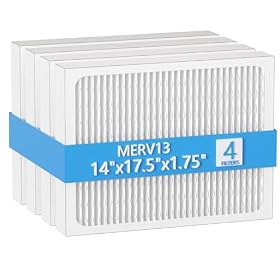
Inspect and clean or replace the air filter when restricted airflow may be limiting moisture removal and making the dehumidifier run without lowering humidity.
Compare the unit’s capacity with the room, basement, laundry area, and ongoing moisture conditions because an undersized dehumidifier may run constantly without reaching the target humidity.
Request a topic and help us choose what to build next.
Seal basement leaks and stop moisture intrusion
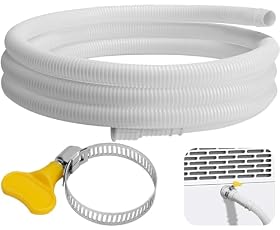
Install a permanent dehumidifier drain hose
Repair a failed compressor or refrigeration system
Choose a replacement dehumidifier with the right features
Requests help us prioritize the next guide. No email required.
One anonymous request per topic.
Dehumidifier running but humidity not dropping
If your dehumidifier is running but the humidity level is not falling, first verify the humidity reading with a separate hygrometer and make sure the unit has adequate airflow. Then check the filter, air path, room conditions, drain setup, frost buildup, and operating temperature. A dehumidifier cannot keep up with continuously entering moisture, and it may collect little water if the room is too cold or the unit has a refrigerant or compressor problem.
1. Confirm the humidity reading
The built-in humidity display may not represent the humidity in the middle of the room. Check the air with a separate digital hygrometer placed:
Several feet away from the dehumidifier
Away from exterior walls, windows, doors, vents, and direct sunlight
Around chest height rather than on the floor
Away from humidifiers, drying laundry, bathrooms, and other moisture sources
Let the dehumidifier run for several hours with the room closed before comparing readings. Humidity will not fall quickly if the space contains wet carpeting, damp masonry, recently dried clothes, or other moisture-holding materials.
Also compare the setpoint with the actual reading. If the unit is set to 55% relative humidity and the room is at 58%, it may run intermittently rather than continuously. For a basement or damp room, a setting around 45% to 55% is commonly used, but follow the manufacturer’s guidance and avoid creating excessively dry conditions.
2. Clean or replace the air filter
A dirty filter is one of the most common causes of poor dehumidification. Restricted airflow can reduce the amount of humid air passing over the cold coil, causing the unit to collect less water or frost over.
Turn the unit off and unplug it before servicing the filter. Depending on the model:
Remove the filter according to the manual.
Vacuum loose dust from the filter and intake grille.
Wash the filter only if the manufacturer says it is washable.
Let a washable filter dry completely before reinstalling it.
Replace a damaged, permanently clogged, or non-washable filter.
Do not operate the dehumidifier without its filter unless the manual specifically permits it. Keep furniture, curtains, boxes, and stored items away from the intake and discharge grilles.
Product prices and availability are accurate as of the date/time indicated and are subject to change. Any price and availability information displayed on Amazon.com at the time of purchase will apply to the purchase of this product.
3. Check the hose, drain, and water container
A drainage problem usually does not stop the unit from removing moisture, but it can make it appear ineffective if the appliance shuts off when the bucket is full.
Check that:
The water bucket is fully seated.
The full-bucket float or sensor is not stuck.
The drain hose is connected to the correct outlet.
The hose slopes continuously downward if using gravity drainage.
The hose is not kinked, crushed, or clogged.
The hose end is not submerged in standing water.
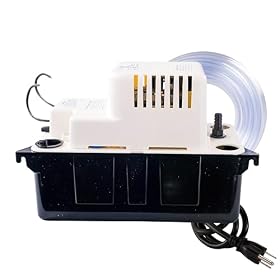
A condensate pump, if used, has power and can discharge water to its destination.
If the bucket is filling normally but the humidity remains high, drainage is probably not the main cause. If little or no water is collecting, continue with the airflow and operating-condition checks below.
Product prices and availability are accurate as of the date/time indicated and are subject to change. Any price and availability information displayed on Amazon.com at the time of purchase will apply to the purchase of this product.
4. Look for leaks and incorrect setup
A dehumidifier can run continuously and still lose ground if humid air or liquid water is constantly entering the space. Inspect for:
Open windows or exterior doors
Basement wall or floor seepage
Plumbing leaks
Damp foundation areas
Wet insulation, carpet, or stored materials
Clothes drying indoors
Bathroom or kitchen exhaust that vents into the room
A crawl-space door or access panel that is not sealed
Close windows and doors while the unit operates. Do not place the dehumidifier in a small enclosed cabinet or directly against a wall. Leave the clearances specified in the manual so air can circulate around the intake and outlet.
If the space has active water intrusion, repair the source first. A dehumidifier can reduce airborne moisture, but it is not a substitute for waterproofing, leak repair, ventilation improvements, or professional mold remediation.
Product prices and availability are accurate as of the date/time indicated and are subject to change. Any price and availability information displayed on Amazon.com at the time of purchase will apply to the purchase of this product.
5. Check whether the room is too cold
Many conventional compressor dehumidifiers perform poorly at low temperatures. When the coil becomes too cold, frost can form and restrict airflow. The unit may enter an automatic defrost cycle, run for long periods, or collect very little water.
Look through the grille without touching internal components. Frost or a solid layer of ice on the coil suggests a problem with temperature, airflow, or the refrigeration system. Turn the unit off and allow it to defrost naturally. Do not chip at the ice or use a heat gun.
Check the operating-temperature range in the manual. If the space regularly stays near or below the model’s minimum rated temperature, a low-temperature-rated dehumidifier or a different moisture-control approach may be more suitable. A desiccant-style unit can be an option in some cold spaces, but its electrical use and heat output may differ from a compressor model.
Product prices and availability are accurate as of the date/time indicated and are subject to change. Any price and availability information displayed on Amazon.com at the time of purchase will apply to the purchase of this product.
6. Make sure the capacity fits the space
A unit that is too small may run constantly without reaching the desired humidity, especially in a basement, laundry area, or room with ongoing moisture intrusion. Capacity depends on more than floor area. Important factors include:
Room or basement size
Starting humidity level
Temperature
Whether the space is mildly damp or visibly wet
Number of occupants
Air exchange with other rooms
Laundry, bathing, cooking, or drying activities
If the dehumidifier works normally in a smaller closed room but cannot lower humidity in the target space, it may be undersized or the space may need to be divided and treated separately. Avoid relying only on a model’s maximum extraction claim; those figures are measured under specific test conditions and can be much higher than real-world collection in a cool or mildly damp room.
7. Inspect for frost, unusual noises, or heat
After cleaning the filter and allowing the unit to operate in a warm enough room, observe its behavior:
Runs but collects no water: Check room temperature, airflow, humidity measurement, and whether the compressor is actually engaging.
Collects some water but never lowers humidity: Look for ongoing moisture sources, open areas, poor sizing, or a building-envelope problem.
Frosts repeatedly: Suspect low temperature, restricted airflow, a failed fan, or a refrigeration-system fault.
Fan runs but the compressor never starts: The unit may be in a delay cycle, operating at its setpoint, or experiencing a control, capacitor, compressor, or refrigerant problem.
Makes grinding, buzzing, or repeated clicking sounds: Unplug it and consult the manual or a qualified appliance technician.
Gets unusually hot, smells burnt, trips a breaker, or damages the cord: Stop using it and disconnect power. Electrical diagnosis should be handled by a qualified professional.
Do not open the sealed refrigeration system or attempt to add refrigerant. These repairs require specialized equipment and may not be economical on a household portable unit.
8. When to repair or replace the dehumidifier
A replacement filter, hose, bucket, or condensate pump is reasonable when that part is damaged or clearly causing the problem. Consider professional service when the unit is otherwise in good condition but has a fan, control, or compressor fault and the repair cost is justified.
Replacement is often the practical next step when the unit has a sealed-system problem, repeatedly freezes after airflow and temperature issues are corrected, has electrical damage, or cannot maintain the humidity level despite being correctly sized. Before buying another unit, confirm the room’s moisture source and check the new model’s operating-temperature range, drainage options, filter access, and rated capacity.
Close doors and windows and remove obvious moisture sources.
Clean or replace the filter.
Clear the intake and outlet and provide the required clearances.
Check the bucket, hose, gravity drain, or condensate pump.
Look for frost and confirm the room is within the operating range.
Decide whether the unit is undersized for the space.
Stop using it for electrical hazards, sealed-system faults, or serious mechanical problems.
FAQ
How long should it take a dehumidifier to lower humidity?
In a closed, appropriately sized room, you may see a change within several hours, but damp materials, cool temperatures, and ongoing moisture entry can make the process take much longer. Use a separate hygrometer and compare readings from the same location.
Why is my dehumidifier running but not collecting water?
Common causes include a dirty filter, blocked airflow, a full or incorrectly seated bucket, a room that is too cold, a humidity setpoint that has already been reached, or a refrigeration-system fault. Check the filter, drainage, room temperature, and setpoint before seeking service.
Can a dehumidifier lower humidity with windows open?
Usually not efficiently. Outdoor air can continually add moisture, particularly in warm or humid weather. Close windows and exterior doors while dehumidifying unless the manufacturer or a building professional recommends ventilation for a specific condition.
Should I replace a dehumidifier that keeps freezing up?
Not immediately. Clean the filter, confirm unrestricted airflow, and check that the room is within the model’s rated temperature range. If it still freezes repeatedly, the fan or sealed refrigeration system may be failing, and replacement may be more practical than repair.