A dehumidifier filter reminder light is easy to dismiss, but ignoring it can reduce airflow, increase noise, and make the unit work harder. Clean or replace the filter, check for airflow problems, then reset the reminder according to the manufacturer’s instructions.
A dehumidifier filter reminder light usually means the scheduled cleaning interval has passed—not necessarily that the filter is completely blocked. Do not simply ignore it: remove and inspect the filter, clean or replace it as directed, reinstall it correctly, and then reset the reminder. If the light returns immediately or the unit still has weak airflow, check for clogs, leaks, incorrect setup, and electrical or motor problems.
What the filter reminder light means
Most dehumidifiers use a timer to remind you to inspect the air filter after a certain amount of operating time. The light may come on even when the filter looks only lightly dusty, especially in a clean room.
The reminder is not always an air-quality sensor. Resetting it only clears the notification; it does not clean the filter or repair an airflow problem.
A dirty filter can cause:
Lower moisture-removal performance
Reduced airflow from the outlet
More fan noise
Frost or ice on the coils
Longer run times and higher energy use
Overheating or shutdowns in some units
How to clear the reminder safely
Turn the dehumidifier off and unplug it. Do not remove the filter while the fan is running.
Find the filter. It is commonly behind the intake grille, but follow the owner’s manual for your model.
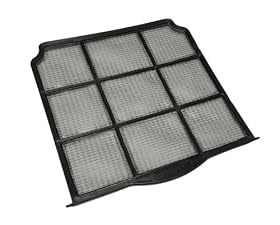
Inspect the filter in good light. Look for dust, lint, pet hair, mold-like growth, or a damaged frame.
Clean it only as the manufacturer allows. Many reusable mesh filters can be vacuumed or rinsed with clean water. Do not wash a filter labeled disposable, and do not use detergent unless the instructions specifically permit it.
Dry a washable filter completely. A wet filter can restrict airflow and may contribute to odor or moisture problems.
Reinstall the filter in the correct direction and position. A loose or backwards filter can let dust bypass the intake or prevent the grille from closing.
Plug the unit back in and reset the reminder. The reset button or button combination varies by model. Use the manual rather than holding random controls.
If the reminder stays on after a proper reset, the filter may not be seated correctly, the reset sequence may be different, or the control panel may have a fault.
Product prices and availability are accurate as of the date/time indicated and are subject to change. Any price and availability information displayed on Amazon.com at the time of purchase will apply to the purchase of this product.
If the light returns quickly
Check the filter again
A filter that becomes dirty within days may indicate unusually dusty conditions, nearby construction, pet hair, smoke, or a return-air grille that is too close to a wall or furniture. A filter that is discolored, warped, torn, or difficult to clean should be replaced with the correct type.
Do not operate the unit without its filter unless the manufacturer specifically permits it. A missing filter can allow debris to reach the fan and coil.
Check the intake and exhaust openings
Leave the clearances specified in the manual around the dehumidifier. Make sure curtains, boxes, rugs, and furniture are not blocking the intake or warm-air outlet. Vacuum loose dust from the grille without pushing debris into the machine.
Check the hose and drain setup
If the unit is set up for continuous drainage, inspect the drain hose for kinks, sagging, clogs, or an uphill section. A drainage problem usually does not cause the filter light by itself, but it can make the unit stop, fill, or appear to run incorrectly.
Check for air leaks or incorrect assembly
Confirm that the filter cover, bucket, and other removable panels are fully seated. If the bucket is not installed correctly, some units will not operate normally. Do not tape over safety switches or run the dehumidifier with panels removed.
Check whether the drum or bucket is full
A full water bucket can stop the compressor and fan behavior may change. Empty and reinstall the bucket according to the manual. If the unit has a drain pump, check its reservoir and discharge hose as well.
Product prices and availability are accurate as of the date/time indicated and are subject to change. Any price and availability information displayed on Amazon.com at the time of purchase will apply to the purchase of this product.
What if the dehumidifier still performs poorly?
After cleaning or replacing the filter, run the unit in a room within the operating temperature and humidity range listed by the manufacturer. Very cold basements can cause some dehumidifiers to frost, while an oversized or undersized unit may not behave as expected in a particular space.
Unplug the unit and stop using it if you notice a burning smell, damaged cord, repeated breaker trips, water near electrical components, unusual grinding, or a fan that will not start. Do not open the sealed refrigeration system or attempt electrical repairs unless you are qualified to do so.
A service call may be reasonable when:
The filter reminder cannot be reset despite following the manual
The light returns immediately with a clean, correctly installed filter
The fan runs but airflow remains very weak
The coils repeatedly ice over in suitable room conditions
The compressor clicks on and off without removing moisture
The unit leaks after the bucket, hose, and seals have been checked
When to replace the filter or the dehumidifier
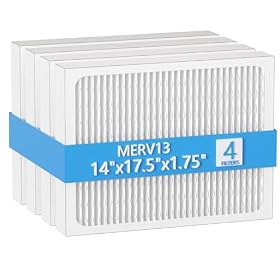
Replace the filter when it is disposable, permanently clogged, torn, warped, or no longer fits tightly. Use the exact replacement type or the equivalent specified by the manufacturer; a filter that is too dense can reduce airflow even if it physically fits.
Replacing the dehumidifier may make more sense when the unit is older, has a failed control board or compressor, has severe corrosion, or needs a repair that approaches the cost of a suitable replacement. A clean filter and a reset reminder will not solve a failing fan motor, refrigeration fault, or damaged electrical system.
Can I ignore the dehumidifier filter reminder light?
You can usually keep operating the unit briefly, but it is better to inspect the filter promptly. A blocked filter can reduce airflow, increase noise, cause icing, and make the dehumidifier run less efficiently.
Why is the filter light still on after cleaning the filter?
The reminder may need a separate reset sequence, the filter may not be seated correctly, or the control panel may have a fault. Follow the model’s instructions and confirm that the filter is completely dry and installed in the correct position.
How often should a dehumidifier filter be cleaned?
Use the manufacturer’s schedule as a starting point, then inspect the filter more often in dusty rooms, basements, homes with pets, or during renovation. Clean it whenever visible buildup restricts the mesh.
Can I run a dehumidifier without its filter?
Usually no. Operating without the filter can allow dust and debris to reach the fan and coil. Only do so if the manufacturer’s instructions specifically allow it.
Should I replace a washable dehumidifier filter?
Replace it if it is torn, warped, permanently clogged, or no longer seals correctly. Otherwise, clean it as directed and replace it only when the manufacturer recommends or supplies a replacement.