If a dehumidifier is collecting less water, a dirty filter or coil can restrict airflow and reduce moisture removal. Follow these safe cleaning and troubleshooting steps before replacing the unit.
A dehumidifier that collects less water may have dirty coils, a clogged filter, restricted airflow, or a drainage problem. Unplug the unit, clean the filter first, then inspect the accessible coil surfaces and hose connections. If the coils frost over repeatedly or the unit still removes little moisture after cleaning, the problem may be low room temperature, a fan fault, or a sealed-system issue rather than dirt.
Before cleaning the coils
Turn the dehumidifier off and unplug it. Do not work on the unit while it is connected to power. Move it to a dry, stable area if possible, and allow any frost or ice to melt naturally.
Check the owner's manual before removing a panel. Many portable dehumidifiers have an accessible air filter and visible coil surfaces, but internal coil access varies. Do not bend the thin fins, cut refrigerant lines, or spray water or coil cleaner near the control board, fan motor, wiring, or compressor.
If the unit has been running recently, give it time to cool. Wear gloves if the coil edges or sheet-metal panels are sharp.
Clean the filter first
A blocked filter is one of the most common causes of reduced water pickup. It restricts air moving across the cold coil, so the dehumidifier cannot remove moisture efficiently.
Remove the filter according to the manual.
Vacuum loose dust from both sides.
If the filter is washable, rinse it with clean water as directed by the manufacturer.
Let it dry completely before reinstalling it.
Replace a filter that is torn, permanently clogged, or no longer fits tightly.
Do not operate the unit without its filter unless the manufacturer specifically allows it. A missing filter can quickly coat the coil with dust.
Product prices and availability are accurate as of the date/time indicated and are subject to change. Any price and availability information displayed on Amazon.com at the time of purchase will apply to the purchase of this product.
How to clean accessible dehumidifier coils
Once the filter is out, inspect the coil behind it. Look for lint, pet hair, dust buildup, or a matted layer that blocks the fin openings.
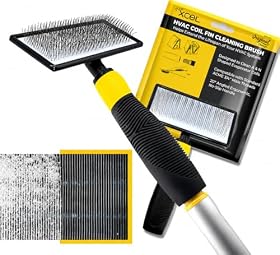
Use a soft brush or a vacuum with a brush attachment to remove loose debris. Work in the direction of the fins rather than scrubbing across them. A narrow, soft coil-cleaning brush can help with compacted dust, but use light pressure.
Avoid high-pressure air unless the manufacturer permits it. Compressed air can drive dust deeper into the unit or spread debris onto the fan and electrical parts. Do not use household cleaners, bleach, or foaming products unless the manual specifically approves them.
If the coil is greasy, heavily contaminated, or inaccessible behind a panel, stop rather than forcing the housing open. A qualified appliance or HVAC technician can clean it without damaging the fins, wiring, or refrigerant circuit.
After cleaning, reinstall the filter and panels. Make sure the air inlet and outlet are unobstructed.
Product prices and availability are accurate as of the date/time indicated and are subject to change. Any price and availability information displayed on Amazon.com at the time of purchase will apply to the purchase of this product.
Check these other causes before blaming the coil
Coil dirt is only one possible cause of slow water collection. Check the following in order.
Inspect the hose and drain path
If the dehumidifier is connected to a hose, check for kinks, crushed sections, clogs, and uphill runs. Gravity-drain models usually need a continuously downward path. Clean the hose connection and confirm that the drain outlet is not blocked.
If the unit uses a condensate pump, check that the pump reservoir and discharge line are clear. Follow the pump manufacturer's cleaning instructions, and disconnect power before handling the pump. A failed pump can cause the bucket to fill even though the dehumidifier is producing water.
Look for air leaks and poor sealing
Confirm that the filter is seated correctly and that removable panels are closed. A loose filter or missing seal can let unfiltered air bypass the intended airflow path.
Inspect the bucket, bucket gasket, drain plug, and hose adapter. These parts usually affect where water goes rather than how much the coil condenses, but a poor fit can cause leaks, shutoffs, or an incorrect full-bucket condition.
Confirm the setup and room conditions
Keep the unit on a level surface with the clearances specified in the manual. Do not push it against a wall, curtain, storage box, or furniture. Restricted intake or exhaust airflow can reduce performance and cause frost.
Dehumidifiers generally collect less water when the room is already fairly dry or cold. In a cool basement, the coil may frost before enough moisture is removed. If the manual provides a minimum operating temperature, stay within that range. Do not chip ice from the coil; turn the unit off and let it thaw.
Also verify the humidity setting. A unit set near the room's actual humidity may run briefly or stop normally. Use a separate hygrometer if you need to compare the displayed setting with room conditions.
Empty and reseat the bucket
A full bucket, misaligned bucket, or stuck float switch can stop the compressor or make the unit appear to be collecting poorly. Empty the bucket, clean its inlet area, and reseat it firmly. Check that the float moves freely if it is accessible without disassembling the unit.
Product prices and availability are accurate as of the date/time indicated and are subject to change. Any price and availability information displayed on Amazon.com at the time of purchase will apply to the purchase of this product.
What to do if the coils keep frosting
A small amount of frost can occur in a cool room, but repeated or heavy frosting after the filter and airflow are clean indicates another issue. Possible causes include restricted airflow, a faulty fan, a temperature sensor problem, or a sealed refrigeration-system fault.
Turn the unit off and let it thaw fully. Do not scrape the coil or use a heat gun. If frost returns quickly under suitable room conditions, discontinue use and consult the manufacturer or a qualified technician. Refrigerant-system repairs are not a do-it-yourself cleaning task.
Product prices and availability are accurate as of the date/time indicated and are subject to change. Any price and availability information displayed on Amazon.com at the time of purchase will apply to the purchase of this product.
When cleaning has not solved the problem
After cleaning the filter and accessible coils, checking drainage, and confirming adequate airflow, run the dehumidifier in a warm, humid room using the manufacturer's recommended settings. Give it enough time to operate continuously rather than judging performance after only a few minutes.
If the fan runs but the unit produces little or no water, the coils remain clean, and the room is warm and humid, the compressor, sensor, or sealed system may need service. A clicking relay, burning smell, repeated breaker trips, damaged cord, or unusual electrical noise is a reason to unplug the unit and seek qualified service.
Replacement is often more practical when the unit has a sealed-system problem, significant corrosion, damaged coils, or repair costs that approach the cost of a suitable new dehumidifier. Use the room size, operating temperature range, drainage method, and humidity target—not just the advertised pint capacity—when selecting a replacement.
FAQ
Can dirty coils make a dehumidifier collect less water?
Yes. Dust and lint can restrict airflow across the coil, reducing moisture removal. Clean the filter first, then gently remove debris from accessible coil surfaces without bending the fins or wetting electrical components.
Can I spray water or coil cleaner inside a dehumidifier?
Only if the manufacturer specifically permits that product and method. Spraying near wiring, controls, the fan motor, or compressor can cause damage or an electrical hazard. Vacuuming or soft brushing is the safer general approach.
Why does my dehumidifier frost up after I clean it?
Frost can result from a cold room, restricted airflow, a fan problem, a sensor fault, or a sealed-system issue. Let the unit thaw naturally, verify the filter and clearances, and follow the manual's temperature guidance. Repeated frost requires service.
How often should dehumidifier coils and filters be cleaned?
Inspect the filter regularly and clean it according to the owner's manual; homes with pets, dust, or renovations may require more frequent attention. Inspect accessible coils whenever the filter is unusually dirty or airflow appears weak.